top of page

Exploring AI in Design using app builder Base44
This case study will only explore the design capabilities of the AI-powered app-building platform Base44, launched in 2025. As a customer experience supervisor, I experimented with Base44 to create an independent app to streamline my tasks specific to managing team performance.
Platform: AI app builder
Timeline: Nov '25- Feb '26
Purpose: AI Exploration

01.
AI Design by Base44.
User Prompt: Design an app to assess team performance based on sales, clothing inventory, season, and daily, weekly and monthly sales targets.
Plan used: Free
Key Features:
Dashboard — Overview of team performance with key metrics and charts
Sales Tracking — Log daily sales by team member, clothing item, and season
Targets Management — Set daily, weekly, and monthly sales targets
Team Members — Manage team roster
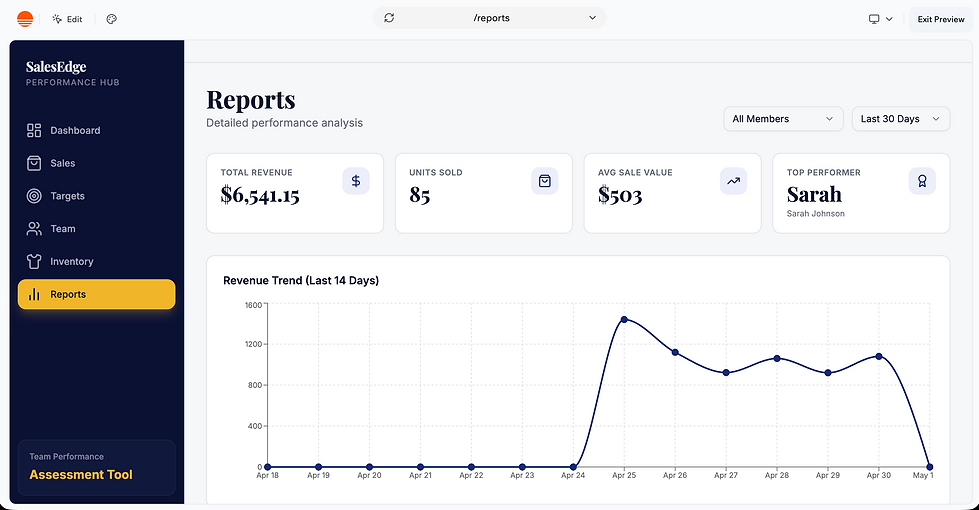
Performance Reports — Detailed breakdowns by person, clothing, and season
Design Language: Modern, clean, with a rich indigo/violet palette for a professional sales dashboard feel.

02.
Evaluation Space
For a small-scale execution, these options are enough.
My initial testing as a Product designer.
UX
User Experience
UI
User Interface
Hits
Misses
Hits
Misses
Responsive-friendly options available
Easy Navigation
Pills - better legibility
Simple User Flow
Uniform Spacing & Layout
-
-
Targets: no link to members
Smaller cards look cluttered
Lack of filters/sorting options
Limited options for reports
No option-edit active targets
No visual confirmation after adding a record
No search bars available
Good sidebar navigation
Good graphic representation
Distinct colour-coded charts
Clean tables, good structure
Labels & iconography-lower cognitive load
Uniform typography
Clear visual design
No coloured season pills.
No date provided for daily sales metrics
Team -Unclear information
Red labels for targets
-
-
-
Conclusion: Overall, the initial design, as per the prompt, serves its purpose. It does have particular UX issues, as any first draft does. But it is a good tool to visualise the initial interface, all in a couple of minutes. Iterations can be made to refine the design further.

03.
Problem Statement
Defining the Problem:
- For a user without access to a brief and an understanding of prompt engineering, it could produce results with a satisfactory User Interface and Visual Design, but it may have issues with the User Experience part of it.
- Initially, to fix that issue, I added another prompt

04.
Solution Space
So, the Product designer/user is now ready to add some features specific to the business.
REDESIGN and CUSTOMISATION:
To address the problems, I asked Base 44 to add some customisations according to what I need.
1. Add the lost sales section.
2. Add the weekly and monthly sales metrics to the dashboard. Makes it easy to prepare daily briefings.
3. Add filters according to item type and category of item. This will help fulfil the specific targets the company sets.
4. Add more reports:
5. Keep colours distinct.
05.
Instights
AI tools like Base 44, similar to Figma Make, are a great starting point for a specific design; in both cases,
1. A designer already has a certain design in mind.
2. They need a starting point.
There are options to further modify the design according to the individual user's needs.
The user has to experiment with the prompts to get the desired effect. Training in prompt engineering will prove useful in such cases.

bottom of page